
This article is part of Effectory's resources on the results dashboard. For a video on how to use the dashboard, please refer to this article.
Are you using Top 2 Box? Please be informed that your scores will look different. For more information, please click here.
Open answers give employees the space to share their thoughts, concerns, and suggestions in their own words. They add important context to your survey results and help explain the stories behind the numbers.
What are open answers?
Open answers are written responses to open-ended survey questions. They provide qualitative insights that complement quantitative scores, helping you better understand what employees experience, value, and want to improve.
Each open answer can contain up to 10,000 characters.
Viewing open answers
In the Open answers tab of the results dashboard, you’ll find all written responses for open-ended questions. When you open the tab, you will first see an overview of all open-ended questions included in the survey.
Can’t see the Open Answers tab?
That usually means no open-ended questions were included in the survey.
Keep in mind that participants can still leave written comments on some multiple choice questions (like Topics of Pride and Points of Improvement). You can find those under the Topics & Ideas tab in the results dashboard.
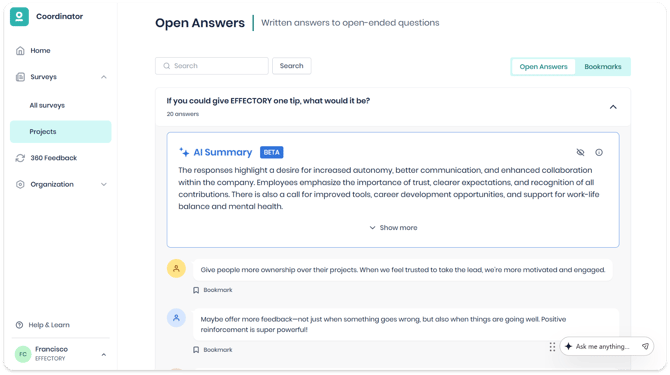
Click a question to expand it and view all open answers given by participants. At the top, you’ll see an AI-generated summary of the open answers for that question (if enough answers were provided). This gives you a quick overview of the main themes before you dive into individual comments.
Note:
-
The AI-generated summary is always created in the project’s default language, regardless of the language you use to view My Effectory.
- AI-generated summaries are also created for custom questions.
Effectory’s approach to AI
We use AI with care and follow strict principles focused on people, transparency, privacy, and compliance. Your data stays safe with us and is never shared with external AI services.
If you want to learn more about Effectory's responsible approach to AI, you can download our full statement in the Security Center.
Confidentiality and responsible use
Open answers can contain personal experiences and sensitive details. That’s why we apply strict confidentiality rules in the results dashboard, and we always protect respondents’ anonymity.
AI-generated summaries follow the same principles. They are created using the open answers available in your results and are shown only to users who already have access to those answers.
For more information, see our article on confidentiality and answers to open-ended questions.
Search and bookmarks
In the Open answers tab, you can use the search bar at the top of the page to find answers containing a specific word or phrase. You can also bookmark individual answers to revisit later. To see your saved answers, go to the Bookmarks tab in the top right of the page.
Note: Bookmarks are personal. They’re only visible to you and not shared with other users.
Downloading open answers
The Excel report [Group name] – Standard group results includes all open answers. You can download it from the Reports tab of the results dashboard. For more details, see Results dashboard: Reports.
Note: Open answers cannot be downloaded as a Word file.