
This article is part of Effectory's resources on the results dashboard. For a video on how to use the dashboard, please refer to this article.
Are you using Top 2 Box? Please be informed that your scores will look different. For more information, please click here.
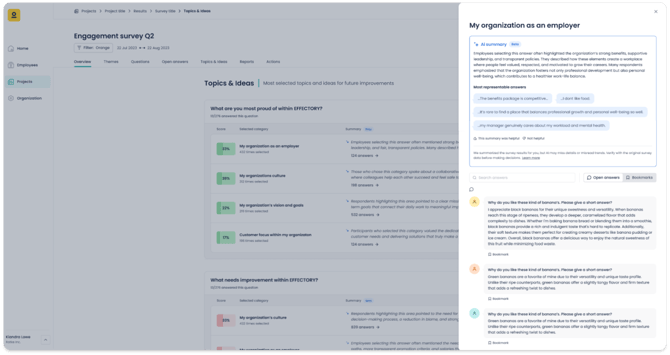
The Topics & ideas tab helps you see which themes matter most to your employees. It combines both quantitative and qualitative feedback, showing not only what employees are proud of or want to improve, but also why. This helps you identify recurring themes and turn insights into action.
Pride and improvement
In the Topics & ideas tab, you will find two sections:
-
Topics of pride
-
Points of improvement
These sections show the answers to two key questions in your survey. Respectively:
-
What are you most proud of within your organization?
-
What needs improvement within your organization?
Respondents can select one or more topics they feel proud of or believe need improvement. The overview displays both the percentage and the number of respondents who selected each topic.
Tip: Since respondents can choose more than one topic, the total percentage doesn’t have to add up to 100%.
Topic-specific comments
After selecting a topic, respondents can add a written explanation. For each topic in the overview, you will see an AI-generated summary of all topic-specific comments (if enough were provided). This gives you a quick overview of the main themes and helps you decide where to dive deeper.
Click a topic to open the full list of comments. A side panel will appear with all comments, along with a more detailed AI-generated summary at the top. If there aren’t enough comments, no summary will be shown.
How is the AI summary created?
The summary is generated by our own deployment of a summarization tool based on GPT models from OpenAI, which reads the employee comments and produces a natural language overview. For very large sets of responses, a representative sample is used so that the summary reflects the dominant topics.
There is no minimum number of mentions required for a topic to appear. Topics mentioned by many respondents are more likely to be highlighted, but a topic raised by just one or two people may still appear if it stands out, especially when the summary is of a small number of comments. There is a minimum of 5 comments required for a summary to be generated.
Note:
-
The summary is an overview of the most prominent patterns, not a full transcript. You can always review the original comments alongside it for additional context.
-
The AI-generated summary is always created in the project’s default language, regardless of the language you use to view My Effectory.
Effectory’s approach to AI
We use AI with care and follow strict principles focused on people, transparency, privacy, and compliance. Your data stays safe with us and is never shared with external AI services.
If you want to learn more about Effectory's responsible approach to AI, you can download our full statement in the Security Center.
Search and bookmarks
In the side panel, you can use the search bar to find comments with a specific word or phrase. You can also bookmark individual comments to revisit later. To see your saved comments, go to the Bookmarks tab in the top right of the side panel.
Note: Bookmarks are personal. They’re only visible to you and not shared with other users.
Downloading topic-specific comments
The Excel report [Group name] – Standard group results includes all topic-specific comments. You can download it from the Reports tab of the results dashboard. For more details, see Results dashboard: Reports.
Note: Topic-specific comments cannot be downloaded as a Word file.