
The Focus View is a condensed view of the Results dashboard designed to help managers quickly understand how their team is doing and where to focus — without having to interpret all results themselves. It is organised into three sections: At first glance, What needs focus, and Celebrate your wins.
Please note: The Focus View is exclusively available for customers who have conducted a Smart Organization Scan or SF-model survey.
This article covers:
- How to access the Focus View
- At first glance
- What needs focus
- Celebrate your wins
How to access the Focus View
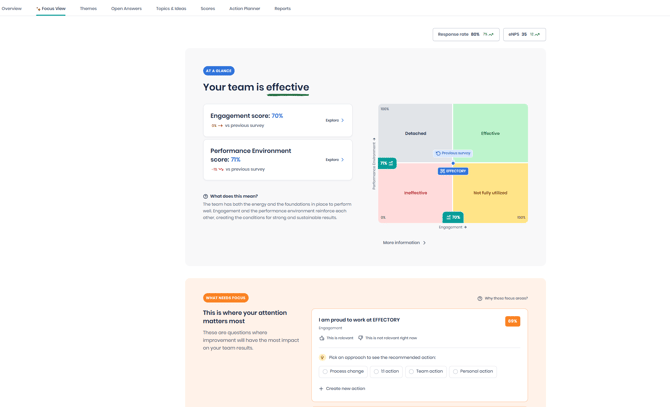
The Focus View is available as a new tab in the Results dashboard, visible to all roles.
If your role is Results Access Coordinator or Local Coordinator, the Focus View is your default view when opening the Results dashboard. Other roles can access the Focus View by selecting the tab at the top of the dashboard.
At a glance
This section gives you a quick snapshot of how your team is doing. It includes:
- Response rate — the percentage of your team that completed the survey
- Effectiveness Matrix — shows where your team sits across four quadrants, with contextual advice based on your team's position
- Engagement score — your team's overall engagement score compared to the benchmark
- eNPS — how likely your team members are to recommend the organisation as a place to work
What needs focus
This section surfaces the three questions that most need your attention based on your team's survey results. These are called your focus areas.
Focus areas are identified using four factors:
- Trend — whether your team's score on this question has declined since the last survey
- Gap — how your team's score compares to the rest of the organization
- Consistency — how aligned your team members are in their responses
- Performance — how your score compares to internal and external benchmarks
Each focus area shows the survey question, the theme it belongs to, and your team's score. You can select a focus area to indicate where you want to concentrate your efforts, and provide feedback on whether it feels relevant for your team.
For more information on how focus areas are computed, click Why these focus areas? at the top of this section.
Recommended actions
Within each focus area, you can pick an approach — such as a self-directed action, a 1-on-1 conversation, a team-level action, or a process change — to see a recommended action tailored to that approach. If a recommendation fits, add it directly to your Action Planner. You can also create your own action instead.
Celebrate your wins
This section highlights the questions where your team is performing well. Use these as a foundation to build on and share them with your team to keep the momentum going.
If no questions have crossed the celebration threshold yet, this section will encourage you to start with your focus areas — your wins will follow.