
Participant sampling allows you to invite a random subset of employees to your survey instead of inviting everyone. This helps you collect feedback more frequently while keeping the survey experience manageable for employees.
In this article you’ll learn:
- Why to use and where to find participant sampling in My Effectory
- How to set up sampling for a single survey
- How to use sampling together with recurring surveys
- Practical use cases and examples
- Important good‑to‑knows about how the sampling logic works
- Some frequently asked questions
1. Why use participant sampling?
Participant sampling is especially useful when you want to:
- Run surveys more frequently without causing survey fatigue
- Collect pulse-style feedback during change or transformation
- Combine organization-wide listening with decentralized pulses
- Reduce manually selecting a subset of participants for a survey
- Combine sampling with recurring surveys to increase coverage over time
Instead of surveying everyone every time, participant sampling helps you listen continuously over time.
You can configure participant sampling during survey creation in My Effectory, in the Participants step of the Create Your Own Survey (CYOS) flow.
2. Set up participant sampling for a survey
Follow these steps to set up sampling for a survey. This set up can be found in the second step of creating a survey: the participant step.
Step-by-step
In the Participants step:
- Enable Participant sampling by enabling the toggle Random sample
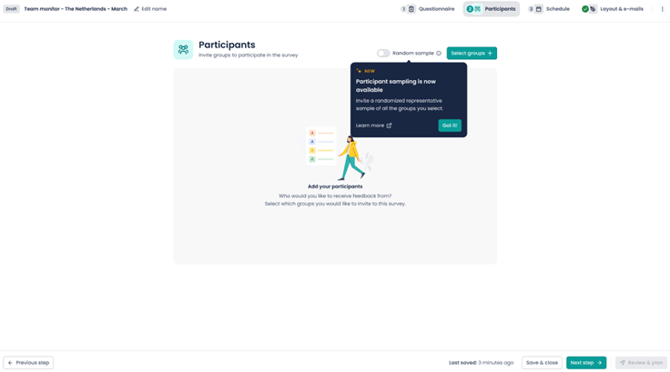
- Select the organizational structure or groups you want to survey
- Select the sample size by using the slider or adding a percentage (for example: 25%)
- The platform immediately shows an estimate of how many participants will be invited and how the sample is distributed across the selected structure
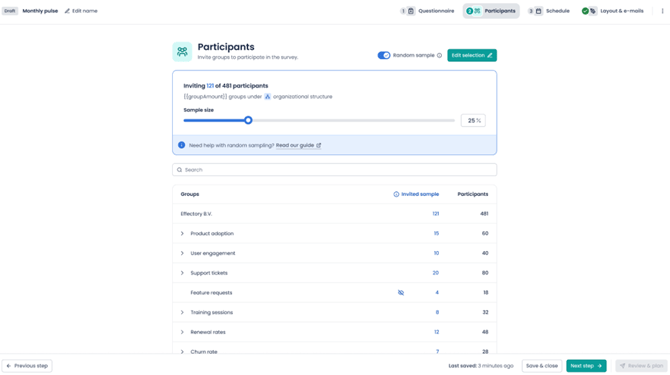
The numbers you see here during setup are estimates. The final sample size is determined when the survey is planned.
- If everything looks good, continue planning your survey as usual.
3. Set up participant sampling for recurring surveys
Participant sampling becomes especially powerful when combined with a recurring survey frequency.
Step-by-step
- Enable participant sampling by enabling the toggle and setting the sample percentage (see the section 2 above)
- In the next Schedule step, select a recurring frequency (for example monthly or quarterly)
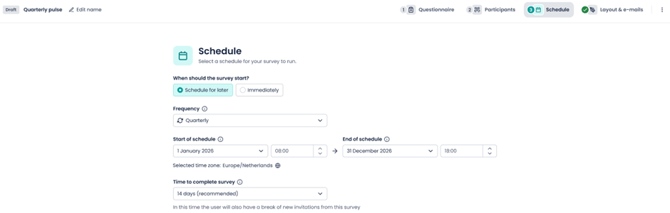
- The platform shows you:
- How many employees will be invited per survey
- How often employees are invited on average
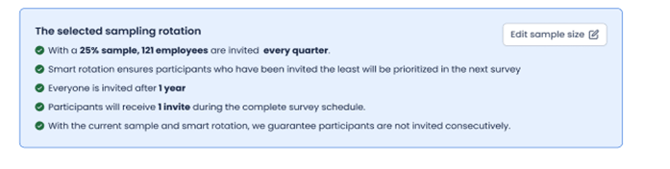

- If you are not happy with this you can edit the sample size or change the frequency
- If everything looks good, continue planning your survey as usual.
Smart rotation
When participant sampling is combined with recurring surveys, the system automatically applies smart sampling:
- Prioritizes employees who have not been invited recently
- Rotates participants across survey cycles
- Avoids repeatedly inviting the same people whenever possible
This means you can increase survey frequency while keeping the employee workload balanced.
Bulk‑edit upcoming recurring surveys (optional)
If you have planned surveys with a recurring frequency and you need to change the setup and sample size, you can bulk‑edit upcoming surveys in the schedule. For example, you can update:
- Sampling percentage
- Selected groups
- Survey frequency or duration
Changes are applied to all future surveys in the recurring series.
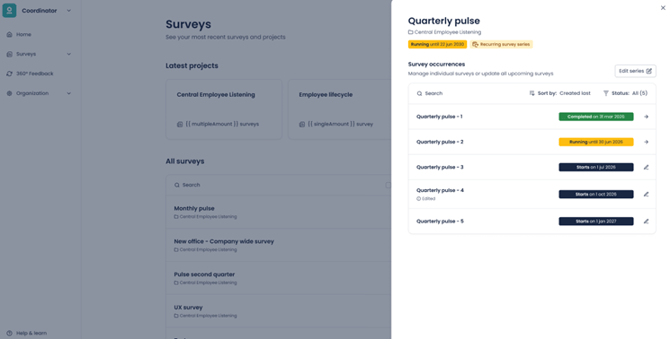
We will replace already planned survey with newly planned surveys, this means that any manual adjustments you made to a single survey within the recurring survey series will be overwritten
4. Practical use cases and examples
Example 1: A single survey with sampling
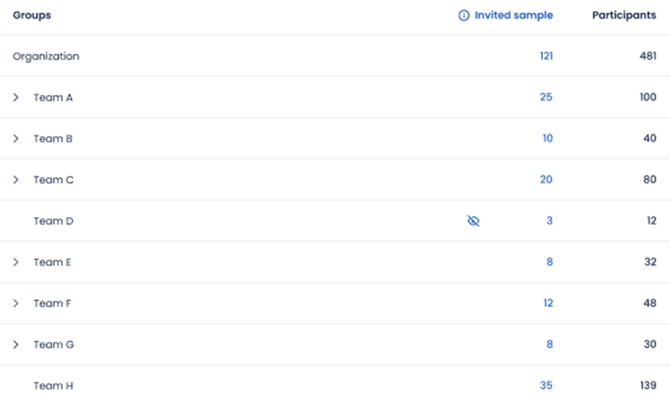
- Organization size: 481 employees
- Selected sample: 25%
The platform invites 121 employees.
- Each group in the structure is represented proportionally
- Participants within each group are selected randomly
This gives you a snapshot of results without surveying everyone.
Example 2: Quarterly survey with 25% sample
- Organization size: 481 employees
- Frequency: Quarterly
- Sample size: 25%
Each quarter, around 121 employees are invited. Because smart sampling prioritizes employees who haven’t been invited yet:
- Over the course of the year, almost everyone is invited once
- Employees do not receive repeated requests
This setup is ideal for sustainable, year‑round listening.
Example 3: Quarterly survey with 50% sample
- Organization size: 481 employees
- Frequency: Quarterly
- Sample size: 50%
On average, employees receive two surveys per year. Which two quarters someone is invited may differ, but invitations are always spread out where possible. Example: employee A receives the survey in Q1 and Q3, employee B receives the survey in Q2 and Q3
This works well if you want stronger trend signals but still reduce survey load.
5. Good to know
- Participants are selected randomly, but evenly across your organization/ your selected structure. This means every selected group receives the same percentage of invitations, and the employees within each group are chosen at random.
- Counts shown during setup are estimates; final numbers are shown after planning
- Smart sampling : We prioritize employees who have not been invited recently, so we try not to re‑invited participants in an active (running)
- With very high sample percentages (for example above 50%), breaks between surveys cannot always be guaranteed
- Sampling affects who is invited, not how scores or results are calculated or reported
- Participant sampling is available for regular surveys and recurring surveys. It is not available for onboarding or exit surveys.
6. FAQ
Why wasn’t a specific employee invited to this survey?
Not everyone is invited to every survey when participant sampling is enabled. The system selects a random subset of employees for each survey and rotates participants over time so everyone gets a chance to participate.
Will everybody eventually be invited?
Yes. When sampling is combined with recurring surveys, the system prioritizes employees who haven’t been invited yet. Over time, most employees will receive an invitation.
Can the same employee be invited multiple times?
This can happen, especially with higher sample percentages or frequent surveys. The system always tries to avoid repeated invitations, but it cannot guarantee breaks between surveys in every situation.
Does sampling affect anonymity?
No. The same anonymity thresholds apply as with any other survey. If results cannot be shown at a specific team level, responses are rolled up to higher levels.
Are the results of sampling less reliable because not everyone is invited?
Participant sampling is designed for practical, continuous listening. It provides strong directional insights over time, but it is not intended as a statistical research method.