
Focus areas are the survey questions that are most important for your team to act on right now. Rather than asking managers to interpret all results themselves, the Focus View identifies up to three focus areas based on your team's data — so you know exactly where to direct your attention.
Please note: Focus areas are exclusively available for customers who have conducted a Smart Organization Scan or SF-model survey.
Where to find focus areas
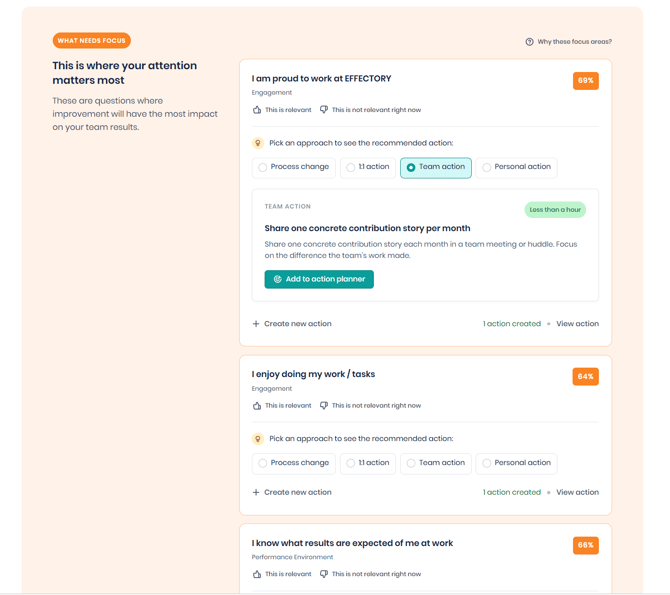
Focus areas are shown in the What needs focus section of the Focus View tab in the Results dashboard.
How focus areas are identified
Each focus area represents a single survey question. The Focus View ranks up to three focus areas using four factors from your team's results:
- Trend — whether the score on this question has declined since the last survey
- Gap — how your team's score compares to the rest of the organization
- Consistency — how aligned your team members are in their responses
- Performance — how your score compares to internal and external benchmarks
Questions that score highest across these four factors are surfaced as your team's top focus areas in the Focus View.
How to use focus areas
In the Focus View, each focus area shows you a survey question, the theme it belongs to, and your team's score. Within each focus area, you can pick an approach - such as a self-directed action, a 1-on-1 conversation, a team-level action, or a process change - to see a recommended action tailored to that approach. If a recommendation fits, add it directly to your Action Planner. You can also create your own action instead.
You can also provide feedback on each focus area to indicate whether it feels relevant for your team right now.