
The Conversation Guide helps you turn your team's survey results into a focused team conversation. It gives you a short, structured sequence to follow, from sharing the overall results to agreeing on what to explore together.
The guide supports the conversation. It does not replace it. Use it to prepare and to keep the discussion on track, and talk with your team directly rather than sharing the guide instead of meeting.
Good to know
- No preparation is needed. You can open the guide right before or during the conversation.
- The guide covers the focus areas shown in Focus View, not every result in the survey.
- The conversation takes about 35 to 45 minutes.
Where to find the guide
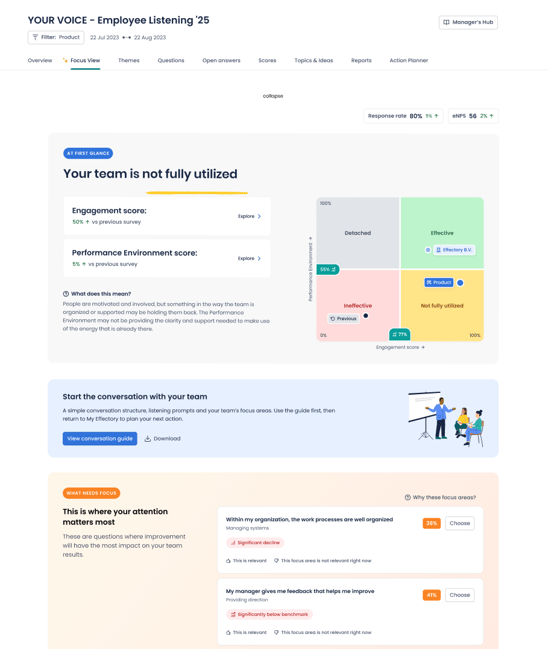
You can open the guide in two places in Focus View:
- Guide card: The card appears under At first glance, directly after your suggested focus areas. Select View conversation guide to open it in its own tab.
- Download: Select Download on the card to save a copy of the guide as a PDF, for example to print it or keep it on hand.
If you no longer need the card, you can hide it. You can still open the guide later from Focus View.
What the guide contains
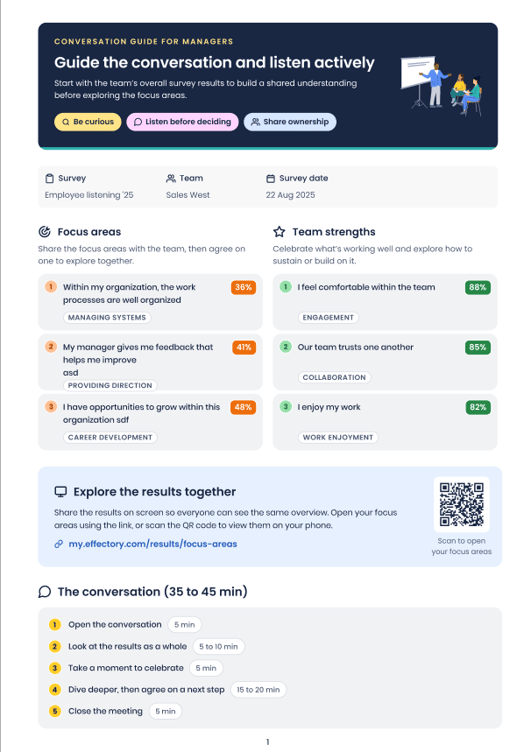
- Overall results: The survey, team, and results period, so everyone starts from the same picture.
- Three focus areas: The areas with the lowest scores, shared with your team before you agree on one to explore.
- Team strengths: The areas with the highest scores, so the conversation also recognises what is working well.
- Results link and QR code: Open your focus areas on a shared screen, or scan the code on a phone, so everyone sees the same results.
- Conversation outline: A step-by-step sequence with a time estimate for each step.
How to run the conversation
Use these principles throughout:
- Be curious: Ask questions before drawing conclusions.
- Listen before deciding: Give the team time to share their view before you decide anything.
- Share ownership: Agree on next steps together.
The conversation takes about 35 to 45 minutes and follows five steps:
- Open the conversation (5 min)
- Look at the results as a whole and select a focus area (5 to 10 min)
- Take a moment to celebrate
- Dive deeper, then agree on a next step
- Close the meeting
The guide provides the prompts for each step.
After the conversation
Once you have agreed on a focus area and next steps, record them in the Action Planner. Your team's input can inform your decision, but the decision remains yours as the manager.
For each focus area, you can choose one follow-up decision:
- Improve: Address the focus area. You can use a suggested action or create your own.
- Monitor: Keep the focus area under review and add your reasoning.
- Need Support: Explain why support is needed and who is best placed to provide it.
- Promote: Reinforce the focus area, add context, and identify who is best placed to support or assign the follow-up.
Create an action whenever the follow-up needs a specific activity. An action captures the concrete next step that supports your decision. You can review focus areas, decisions, and actions on the Actions tab, and export them to Excel.