
Duplicating an existing survey is a quick way to save time when creating a new one. My Effectory allows you to copy the settings from any survey so you can easily make updates and plan it again.
Below you will find all the steps, what we copy for you automatically, and what to keep in mind.
How to duplicate a survey
You can duplicate a survey from two places:
-
the list of all surveys or
-
the specific survey detail page.
Step-by-step
- Navigate to the survey you want to duplicate.
- Click on the three dots (…) next to the survey.
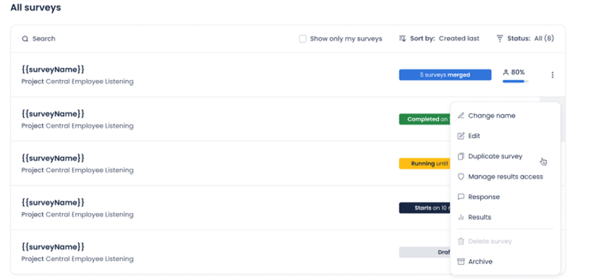
- Select Duplicate survey.
- You’ll see an overview showing what we were able to copy and what could not be copied.
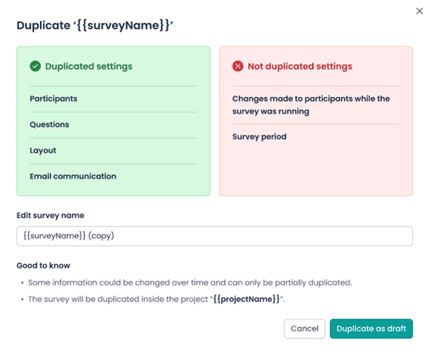
- The duplicate will be created automatically in Draft state.
- You can now adjust settings if needed and Plan the survey
What happens after duplicating?
Always created as a draft
The duplicated survey always becomes a Draft, no matter the state of the original survey (draft, planned, running, or completed). This ensures you can safely edit and adjust everything before planning it again.
Please note: Duplicating a merged survey is not possible.
Rename your survey
You can rename the duplicated survey:
- Directly in the duplication confirmation screen, or
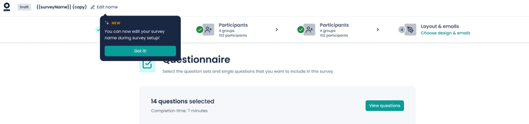
- Later, in the draft survey itself at the top left.
What we copy for you
When duplicating a survey, we copy as much as possible. This includes all steps of the survey creation process:
- Questionnaire
- Participants
- Survey period
- Layout & emails
What we cannot always copy
Some items may not be included in the duplicate. Below are the situations in which this can happen:
Participants
We cannot copy participants when:
- Participants were manually added in the original survey
- Participants were manually removed in the original survey
In these cases, we do still copy selected groups or structures, as long as they still exist.
We cannot copy a structure when:
- The original structure is archived
You will need to select an active structure in the new draft survey.
Survey period
We cannot copy the survey period when:
- The start date is in the past, or
- The start date is within 2 hours from now
You’ll need to set a new valid start date.
Questionnaire
We cannot copy questions when:
- They have been deleted from the project question library
These questions will not appear in the duplicated survey.
If certain settings cannot be copied, you will need to update them yourself before planning the survey again.
But don’t worry—the majority of your survey setup will already be copied for you.