
General
How frequently will the data runs take place?
The data runs will be processed every 24 hours. We can also configure it hourly by setting a specific number of hours between two runs.
Will I get notifications when something goes wrong with a data run?
You will have an in-tool dashboard to monitor the status of all data runs.
Can I still make manual changes to my data on My Effectory?
Yes — if you're using an HR system integration, you can now manually edit values in certain fields directly in My Effectory. For more details, check out our dedicated article.
Can I get data transformations?
Data transformations are possible but exceed the standard setup process. Please get in touch with us to align your requests.
Kombo integrations
What do we mean with Kombo integrations?
Most of our HR system integrations are facilitated by Kombo, a third-party integration provider. Currently, these include:
Alexis HR, Bamboo HR, Breathe HR, Cezanne HR, Charlie HR, Eurecia, Factorial HR, Hailey HR, Heaven HR, HiBob, Humaans, IRIS Cascade, Kenjo, Lucca, NMBRS, Officient, People HR, P-Direkt, Rippling, Sage HR, SAP SuccessFactors, Sapling, Visma Raet Youforce, and Workday.
Can I choose which HR system fields are mapped to My Effectory?
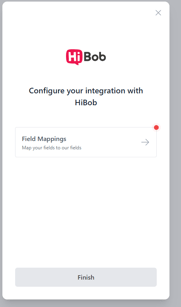
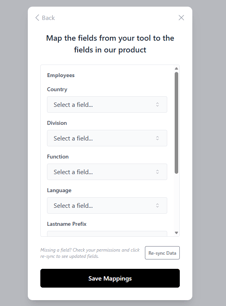
Yes, for certain HR system integrations (facilitated by Kombo, see list above), you can select the field mappings yourself during the connection setup. In the connection flow, choose Field Mappings, then select the field from your HR system that matches each field in My Effectory (for example Country, Division, Function, or Language). Click Save Mappings when you're done.
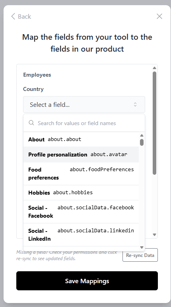
The fields you can choose from are a predefined list provided by Effectory. This list may be extended over time. If a field you need isn't on the list, you can request it to be added. Use the search box in the dropdown to find a field by name or value.
A field I need is missing from the list. What should I do?
Check that the HR system user connected to the integration has permission to access that field. Then click Re-sync Data to refresh the list of available fields. If the field still doesn't appear, contact the Effectory Helpdesk.
Can I change field mappings after an integration has been set up?
Not yet. Field mappings can currently only be selected during the connection flow. Changing them for an existing integration is planned but not yet available.