
As a participant, you can edit your response to a survey you have already submitted, as long as the survey is still open. This allows you to correct mistakes or adjust your answers if needed.
When can I edit my response?
You can edit your response if:
-
You have already submitted the survey
-
The survey is still open
-
You were invited to the survey by email and therefore have access via Your Feedback
Caution: If the survey is closed, it is no longer possible to edit your response.
How do I edit my response?
-
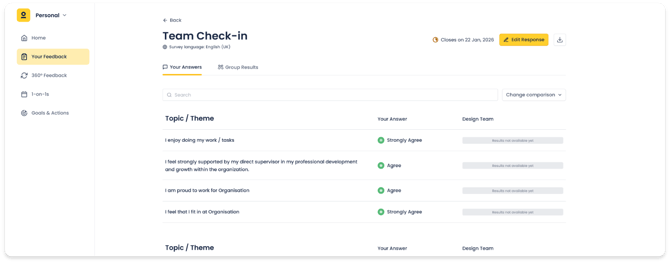
Find the open survey you already submitted and open it
-
On the Your answers page, click Edit response (top right)
-
You will be taken back to the survey with your previous answers filled in
-
Make your changes and submit the survey again before it closes
Important to know before editing
When you reopen a survey:
-
Your previous answers remain visible and can be edited
-
Your original response is temporarily withdrawn
-
Your response will only count again after you resubmit the survey
Make sure you have enough time to complete and resubmit the survey before it closes!
What happens if I don’t submit again?
If you reopen a survey but do not submit it again before the survey closes, your response will not be included in the final survey results for your team and for the organization as a whole. To make sure your feedback counts, always click Submit after making changes.
Why can’t I see the Edit response button?
You may not see the Edit response option if:
-
The survey has already closed
-
You have not submitted the survey yet
-
You were invited without an email address (for example via a printed invitation)
In these cases, please contact the Helpdesk if you need assistance.
Need help?
If you have questions or experience issues reopening your survey, our Helpdesk is happy to help.