
Printable invitations help you invite employees to a survey when email is not the best way to reach them. This article gives a general overview. For step-by-step instructions, see How to download printable invitations for participants.
What is a printable invitation?
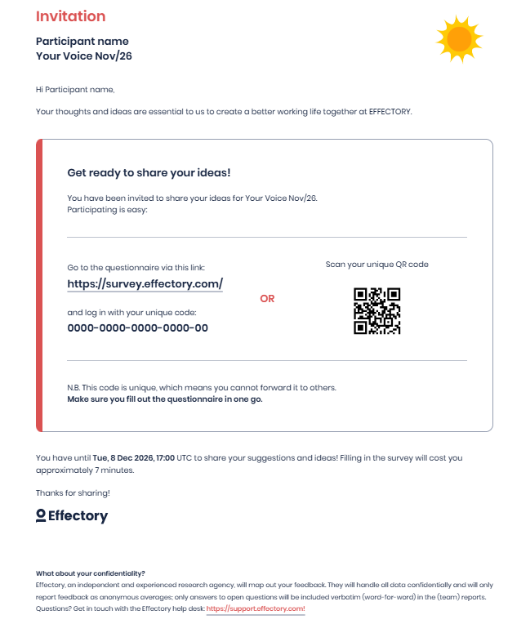
Each printable invitation contains:
- The employee's name
- A unique login code
- A QR code that links directly to the survey
Employees can scan the QR code, or enter their login code at login.effectory.com, to access their personal questionnaire.
Who receives a printable invitation?
The system generates a printable invitation when the email address field for an employee in the employee data file is empty. When planning a survey, consider if you have any employees who cannot be reached via email. Make sure that for these employees the email field is empty.
If it is not empty and you know that email address is not in use, remove the address from the employee data before you continue setting up a survey.
For participants whose data comes through an integration, this can be more complicated, because the data is synced from another system and would overwrite any manual changes. In that case, you can consider using the downloadable Excel list with login codes instead. Only Central Coordinators can access this list. Check the article Distribute login codes via your own channels for more information.
When should you use printable invitations?
Consider printable invitations when:
- The email address field is empty for participants, or they do not have a company email address.
- Employees rarely use their company email address.
- Email invitations are not reaching participants.
- Employees work in locations where printed materials are easier to distribute.
- You want an alternative access method to email invitations.
How it works
- Based on the data from the employee file, printable invitations are generated for participants without email address in My Effectory.
- Download the invitations.
- Print and distribute the invitations.
- Employees scan the QR code or enter the login code at login.effectory.com.
- Employees complete the survey.
Requirements
Printable invitations require the non-desk worker bundle as an add-on to your subscription. If you need more information, please contact your Customer Success Manager.
Good to know
- Employees invited with a printable invitation cannot access Your Feedback, because Your Feedback requires an email address.